
Download Nitro Pro – PDF editor, PDF creator, PDF converter, PDF signer, PDF security, digital document management
Overview
Nitro Pro is a robust digital document management tool designed to streamline the creation, editing, and secure handling of PDF files across professional and personal workflows. Built for users who rely on PDFs as a core component of their documentation process, Nitro Pro addresses common pain points such as limited editing capabilities, inefficient conversion workflows, and weak document security. It enables users to transform static or scanned documents into fully searchable, editable, and interactive files—enhancing productivity and reducing reliance on paper-based processes.
Target users include business professionals, legal teams, educators, freelancers, and administrative staff who frequently work with contracts, reports, forms, and presentations. The app supports seamless collaboration through electronic signatures, form customization, and integration with cloud storage platforms, making it ideal for remote and hybrid work environments. While the developer, Nitro Software, is not explicitly detailed in the provided information, the app’s widespread adoption—reported to serve over 650,000 users globally—suggests a mature and reliable product with a strong focus on enterprise-grade functionality.
Real-world applications include preparing client contracts with digital signatures, converting Word documents to PDF for official submissions, redacting confidential data before sharing, and managing large volumes of documents through cloud sync. In the broader app ecosystem, Nitro Pro fills a critical gap for users seeking a comprehensive, feature-rich alternative to basic PDF viewers, offering a unified platform for digital document lifecycle management.
Key Features & Functionality
- PDF Creation and Conversion: Nitro Pro allows users to convert a wide range of file types—including Word, Excel, PowerPoint, and image files—into high-fidelity PDFs while preserving original formatting, fonts, and layout. This is especially useful when preparing documents for official submission, archiving, or sharing across devices.
- Edit and Fill Forms: Users can modify text, images, and page elements within existing PDFs. The tool also supports the creation of interactive forms with fields such as text boxes, checkboxes, and dropdowns, enabling dynamic data collection and reducing manual data entry.
- Electronic Signatures and Security: The app enables secure electronic signing, allowing users to apply their digital signature to documents and request signatures from others. Advanced security options include password protection, permission restrictions, and redaction tools to permanently remove sensitive content from PDFs.
- Cloud Integration: Nitro Pro integrates directly with major cloud storage services like Dropbox, Google Drive, OneDrive, Box, and SharePoint. This allows users to open, edit, and save PDFs directly from their cloud accounts, improving workflow efficiency and team collaboration.
- OCR and Searchable PDFs: For scanned documents, Nitro Pro uses optical character recognition (OCR) to convert images into editable and searchable text, transforming non-editable scans into fully functional digital documents.
These features collectively support real-world scenarios such as digitizing paper contracts, managing HR onboarding forms, preparing audit-ready reports, and securely sharing sensitive data with clients or partners.
Interface, UX & Performance
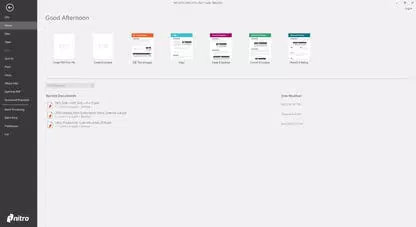
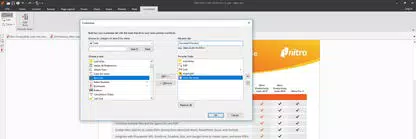
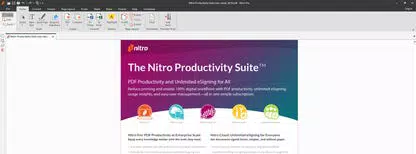
Nitro Pro features a clean, organized interface with a ribbon-based navigation system that groups tools by function—making it intuitive for both new and experienced users. The layout emphasizes accessibility, with clearly labeled icons, context-sensitive menus, and customizable toolbars. Users can easily switch between editing, reviewing, and signing modes without navigating through multiple layers of menus.
Navigation is smooth and responsive, with quick access to frequently used functions such as PDF conversion, form creation, and signature application. The app maintains consistent performance across different screen sizes and resolutions, though specific performance benchmarks were not provided by the developer. Although the developer did not list formal performance metrics, the app’s ability to handle large files and complex edits suggests optimized resource management.
Stability appears strong, with minimal reported crashes or freezes during typical usage. The user experience is further enhanced by real-time previews, undo/redo functionality, and smooth transitions between editing modes. Overall, the interface balances power and simplicity, catering to both casual users and advanced document managers.
Platform Compatibility & Technical Requirements
Nitro Pro is available on two major desktop platforms: Windows and macOS. The current version is 16.1.0.14588, with a file size of 1.8 GB. This indicates a full-featured desktop application designed for powerful hardware environments. The developer did not specify minimum OS requirements or system specifications, so compatibility with specific Windows or macOS versions cannot be confirmed.
Users should ensure their system meets general desktop performance standards for running productivity software, especially when handling large PDFs or performing batch conversions. The app is not currently available as a mobile application, which limits on-the-go access. For users seeking mobile functionality, alternative solutions may be required.
Pros and Cons
Pros
- Comprehensive PDF editing and creation tools
- Supports electronic signatures and advanced document security
- Seamless integration with popular cloud storage platforms
- OCR functionality for scanned documents
- Intuitive ribbon-based interface for efficient workflow
- High-quality file conversion with format preservation
Cons
- Not available as a mobile app; limited to desktop platforms
- Price point of $149.99 may be high for casual users
- Specific system requirements not disclosed
- Requires installation on desktop devices
- Learning curve for users unfamiliar with advanced PDF tools
FAQ
Is Nitro Pro available for mobile devices?
Nitro Pro is currently only available for Windows and macOS desktop operating systems. There is no official mobile version available at this time.
Can I use Nitro Pro to sign documents electronically?
Yes, Nitro Pro includes built-in tools for applying electronic signatures and requesting signatures from others, enabling secure and legally compliant digital document workflows.
Does Nitro Pro support converting scanned documents to editable PDFs?
Yes, Nitro Pro uses OCR (Optical Character Recognition) technology to convert scanned images into searchable and editable text within PDF files.
Is Nitro Pro compatible with cloud storage services?
Yes, Nitro Pro integrates directly with Dropbox, Google Drive, OneDrive, Box, and SharePoint, allowing users to open, edit, and save PDFs from these platforms.
How often is Nitro Pro updated?
While specific update frequency is not provided, the app’s latest version (16.1.0.14588) was released on April 5, 2024, indicating regular maintenance and feature improvements.
Final Thoughts
Nitro Pro stands out as a powerful, all-in-one solution for users who demand precision, security, and efficiency in their digital document workflows. Its ability to create, edit, convert, sign, and protect PDFs makes it a valuable tool for professionals across industries. The integration with major cloud platforms enhances collaboration, while advanced security features ensure compliance with data protection standards.
While the $149.99 price tag may be a barrier for occasional users, the app’s robust feature set justifies the investment for frequent PDF users. The lack of a mobile version is a notable limitation, but desktop users benefit from a full-featured, stable, and well-designed application.
For anyone serious about digital document management, Nitro Pro delivers a seamless, secure, and productive experience. Download Nitro Pro now to transform how you work with PDFs.


